
Static or class-based
Contents
Static or class-based#
To create a static or class-based model,
we first need to import EmptyCompartment
and some reactions:
from simbio.components import EmptyCompartment
from simbio.reactions import single
SimBio includes a comprehensive set of predefined reactions that relate reactants with products. While they are described later in the docs, for now, it is enough to understand that they can be used as primitives for your model.
To create a model,
we define a Compartment by creating class inheriting from EmptyCompartment:
class Model(EmptyCompartment):
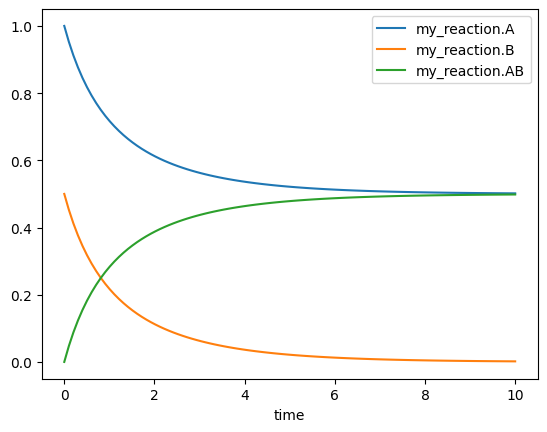
    my_reaction = single.Synthesis(A=1, B=0.5, AB=0, rate=1)
In this example,
we created a Compartment named Model
containing a single Synthesis reaction named my_reaction.
Inside Synthesis,
three Species are created:
A, B, and AB,
with 1, 0.5, and 0 as initial concentrations;
and one parameter,
rate,
with 1 as value.
To simulate this model,
we need to create a Simulator:
from simbio.simulator import Simulator

sim = Simulator(Model)
define an array of times to evaluate the integration,
and call the .run method:
import numpy as np

t = np.linspace(0, 10, 100)
df = sim.run(t=t)

df.head()
| my_reaction.A | my_reaction.B | my_reaction.AB | |
|---|---|---|---|
| time | |||
| 0.00000 | 1.000000 | 0.500000 | 0.000000 |
| 0.10101 | 0.953061 | 0.453061 | 0.046939 |
| 0.20202 | 0.912345 | 0.412345 | 0.087655 |
| 0.30303 | 0.876735 | 0.376735 | 0.123265 |
| 0.40404 | 0.845365 | 0.345365 | 0.154635 |
Behinds the scene,
Simulator compiles the model into a function,
creates a Solver (by default, scipy.integrate.odeint),
and returns a pandas.DataFrame with the result.
It can easily be plotted with .plot():
df.plot()
<AxesSubplot: xlabel='time'>
Sharing Species#
If we want to share Species between different reactions,
we need to explicitly define a Species
and give it a name.
To define a Species,
we use type annotations
(name: type = value),
where the value corresponds to the initial concentration:
from simbio.components import Species


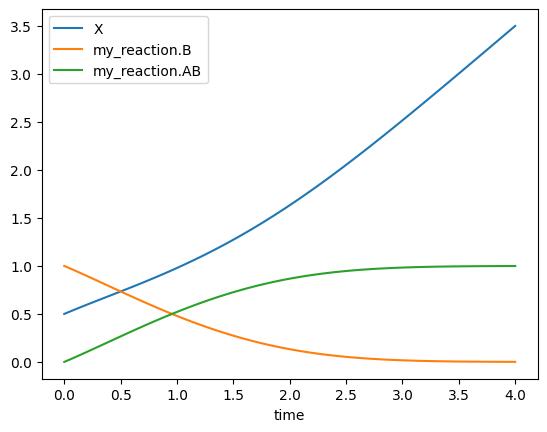
class Model(EmptyCompartment):
    X: Species = 0.5
    create_X = single.Creation(A=X, rate=1)
    my_reaction = single.Synthesis(A=X, B=1, AB=0, rate=1)


t = np.linspace(0, 4, 100)
Simulator(Model).run(t=t).plot()
<AxesSubplot: xlabel='time'>
Sharing Parameters#
Analogously,
Parameters can be shared between reactions,
or as initial concentration of Species:
from simbio.components import Parameter

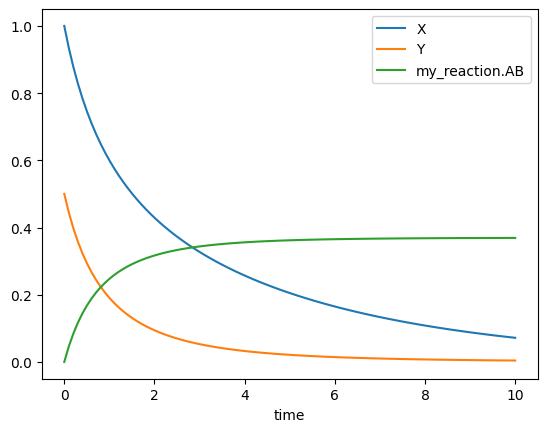
class Model(EmptyCompartment):
    X: Species = 1
    Y: Species = 0.5
    remove_rate: Parameter = 0.2
    remove_X = single.Destruction(A=X, rate=remove_rate)
    remove_Y = single.Destruction(A=Y, rate=remove_rate)
    my_reaction = single.Synthesis(A=X, B=Y, AB=0, rate=1)


t = np.linspace(0, 10, 100)
Simulator(Model).run(t=t).plot()
<AxesSubplot: xlabel='time'>
Varying initial concentrations and parameters#
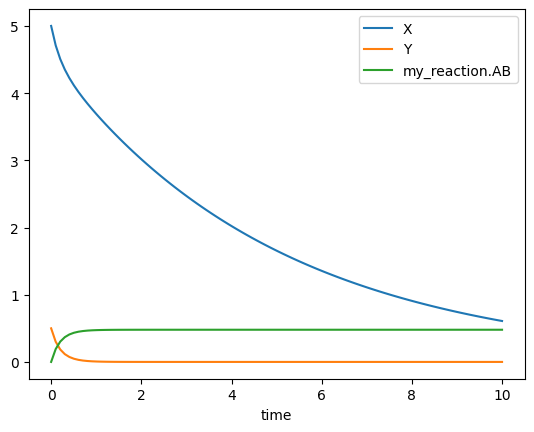
While we set the initial concentrations and parameter values when we create a model, they can be varied at the simulation stage.
To vary them,
we need to pass a dict-like to the Simulator.
There are two ways to define the keys:
as a string:
Simulator(Model).run(t=t, values={"X": 5}).plot()
<AxesSubplot: xlabel='time'>
as a
Compartmentattribute:
Simulator(Model).run(t=t, values={Model.X: 5}).plot()
<AxesSubplot: xlabel='time'>
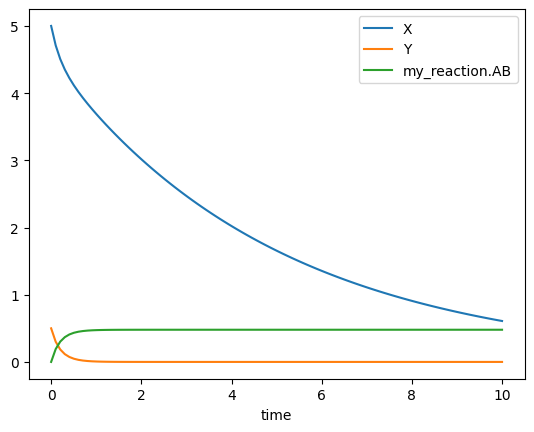
This last one is recommended, as it works with IDE’s code completion, navigation and refactoring features.
Varying linked parameters independently#
In this last model,
the two Destruction reactions share a remove_rate parameter.
We can vary this parameter to vary both reactions simultaneously:
Simulator(Model).run(t=t, values={Model.remove_rate: 0}).plot()
<AxesSubplot: xlabel='time'>
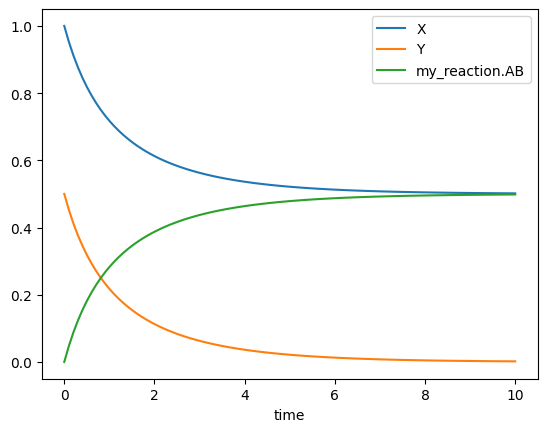
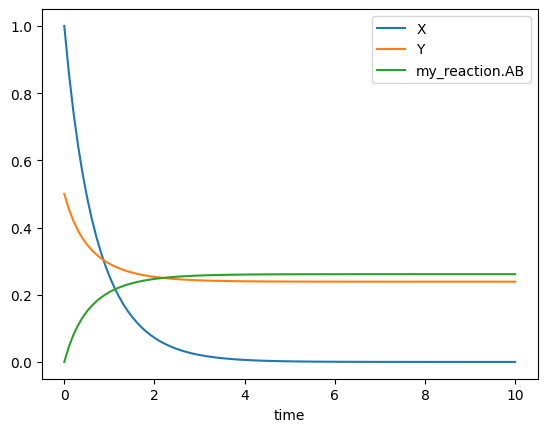
but we can also “unlink” them, and vary one reaction independently:
values = {
    Model.remove_rate: 1,
    Model.remove_Y.rate: 0,  # overrides remove_rate for remove_Y reaction
}

Simulator(Model).run(t=t, values=values).plot()
<AxesSubplot: xlabel='time'>
Extending models#
We can extend a Compartment by inheriting from it:
class Base(EmptyCompartment):
    create = single.Creation(A=0, rate=0.1)


class Extended(Base):
    remove = single.Destruction(A=1, rate=1)


Simulator(Extended).run(t=t).plot()
<AxesSubplot: xlabel='time'>
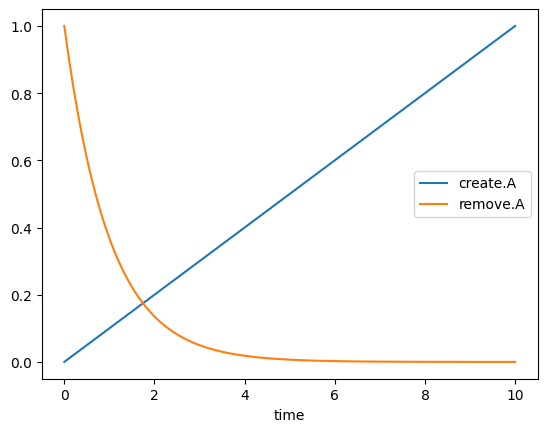
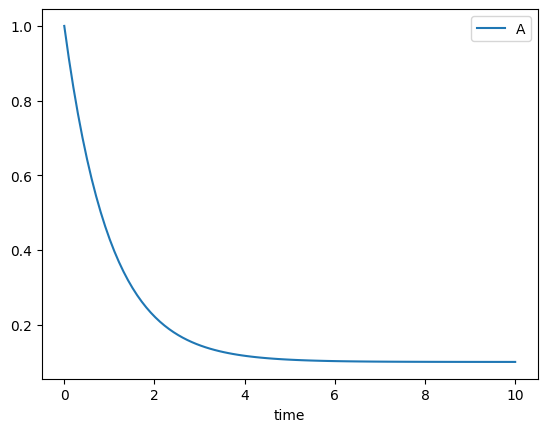
Note that two anonymous species were created in each reaction.
To reuse an Species across models,
we need to add an annotation:
class Base(EmptyCompartment):
    A: Species = 1
    create = single.Creation(A=A, rate=0.1)


class Extended(Base):
    A: Species
    remove = single.Destruction(A=A, rate=1)


Simulator(Extended).run(t=t).plot()
<AxesSubplot: xlabel='time'>
Overriding#
When extending models,
SimBio raises an error if we are redefining some Species:
class Base(EmptyCompartment):
    A: Species = 1

try:
    class Extended(Base):
        A: Species = 2
except ValueError as e:
    print(e)
Collision with existing components. Use Species[Override] or Parameter[Override]. Collisions: {'A'}
This is useful to prevent mistakes.
If we want to override an species’ initial condition, we need to be explicit about it:
from simbio.components import Override


class Base(EmptyCompartment):
    A: Species = 1


class Extended(Base):
    A: Species[Override] = 2
The same is valid for reactions:
from simbio.components import Reaction


class Base(EmptyCompartment):
    my_reaction = single.Creation(A=1, rate=1)


class Extended(Base):
    my_reaction: Reaction[Override] = single.Destruction(A=1, rate=1)
Combining multiple models#
It is also possible to inherit from multiple compartments simultaneously:
class ModelA(EmptyCompartment):
    A: Species = 1
    S: Species = 3

class ModelB(EmptyCompartment):
    B: Species = 2
    S: Species = 3

class Joint(ModelA, ModelB):
    pass
As there are no collisions,
Joint has three species:
A, B and S.
If there are collisions between the models,
SimBio raises an error:
class ModelA(EmptyCompartment):
    A: Species = 1
    S: Species = 3

class ModelB(EmptyCompartment):
    B: Species = 2
    S: Species = 30

try:
    class Joint(ModelA, ModelB):
        pass
except ValueError as e:
    print(e)
Collision with existing components. Use Species[Override] or Parameter[Override]. Collisions: {'S'}
We have to be explicit which one we want to keep, by overriding with a (possibly new) value:
class ModelA(EmptyCompartment):
    A: Species = 1
    S: Species = 3

class ModelB(EmptyCompartment):
    B: Species = 2
    S: Species = 30

class Joint(ModelA, ModelB):
    S: Species[Override] = 42